Inside the Pi Harness
← back
Contents
This is the second part of my series on switching from Claude Code to Kimi + Pi. If you haven't read Part 1, the tl;dr is: Claude regressed hard, I pulled the plug on April 26, and three weeks later I am convinced it was the right call.
What I didn't explain was what I actually did first with Pi. Spoiler: I didn't start by exploring features. I started with a problem: I already had a fleet of parallel agents that worked with Claude and Codex. Would they work with Pi?
I built those fleet skills myself. Bash scripts, tmux panes, DAG ordering, operator-controlled from top to bottom. They shelled out to claude -p and codex exec. I controlled launch, kill, budget, status. Not the model. Me.
Claude Code's built-in Agent tool was never an option. It is model-controlled delegation. The model decides when to spawn, what to delegate, when to kill. A black box. My fleet skills were the opposite: I orchestrate, the workers execute.
The question wasn't "how do I parallelize?" I already knew how. The question was: can Pi run my workers?
3 AM, April 27 2026
I wrote this in my journal at 3 AM, four hours into my first Pi session:
"Claude Code is nothing as compared to this. There is so much flexibility and liberty to tweak things. I am just scratching the surface. I have been at it since last 4 hours straight f**king hooked to the entire thing."
The hook was not the UI. It was spawning four parallel subagents in a live widget, all running simultaneously in one terminal.
Pi Is Self-Documenting
Pi ships with its own documentation as readable files in the install directory. When you ask Pi about its own features, it reads these files directly.
Example questions I asked in my first session:
- "how and when are skills loaded?" Pi read
docs/skills.md, explained loading order and on-demand resolution - "can we add a directory like we can do in Claude?" Pi read
docs/settings.md, searched GitHub issues (#2992, #2619), explained single-cwd constraint - "are global skills from Claude also loaded?" Pi read
docs/skills.mdanddocs/extensions.md, walked through the full skill discovery chain
Docs available: docs/skills.md, docs/extensions.md, docs/sdk.md, docs/settings.md, docs/themes.md, docs/tui.md, docs/keybindings.md, docs/custom-provider.md, docs/models.md, docs/packages.md.
Claude Code is closed source. Internals are private. Unless someone forgets a source map on npm. Pi is open source. Every line is visible. Every doc file is local and the agent can read it mid-session.
First Attempt: Inline Subagents (@tintinweb/pi-subagents)
I installed @tintinweb/pi-subagents from npm. Claude Code-style subagents inside Pi: parallel background agents, live widget with progress bars and token counts, custom agent types via .pi/agents/*.md, mid-run steering, worktree isolation, even cron scheduling.
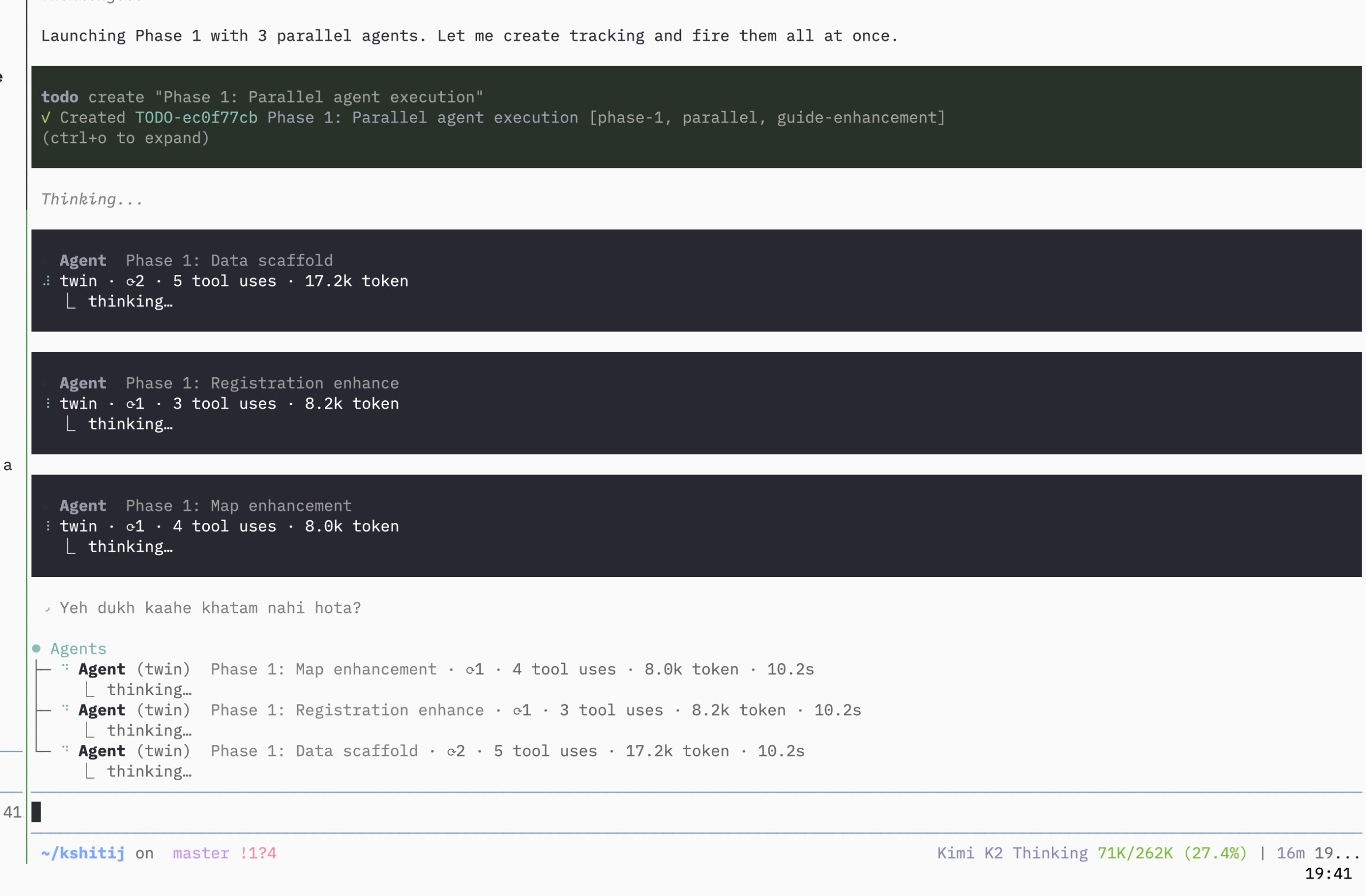
First parallel subagents running in Pi. Four agents, one widget.
Feature-rich. But the orchestration model is the same as Claude Code: the model decides when to spawn, what to delegate, when to kill. I could watch the agents run. I could steer them. But I could not control them the way I needed.
"
@tintinweb/pi-subagents(Claude-style) sucks. Very little operator control. The model owns orchestration, not you."
- My journal, April 27, 1:00 AM
It is a thin wrapper over subprocess spawning with a flashy TUI. Might work for simple delegation. Did not work for how I run things.
Second Attempt: Interactive Subagents (pi-interactive-subagents)
Then I found pi-interactive-subagents by HazAT.
This was different. Real multiplexer panes. Each subagent gets its own tmux/zellij/WezTerm window beside your current session. Pi works in automated mode inside each pane, and there is an input bar for steering. You can see what every agent is doing simultaneously.
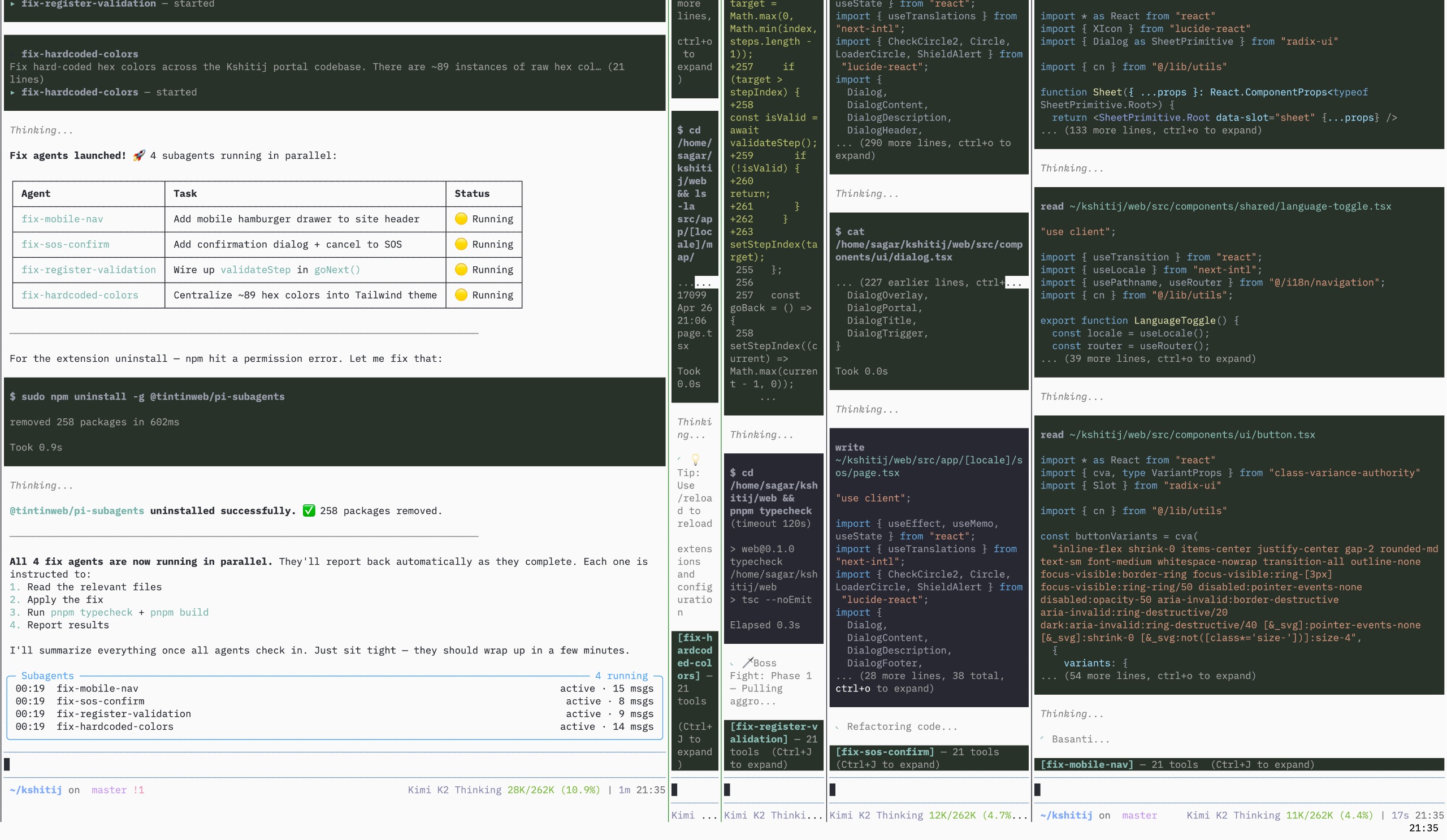
Four subagents, each in their own pane. I can watch and steer any of them live.
And steering actually works. You can change the behavior of a subagent mid-execution. I rarely steered, only once in a while if I forgot something or felt an agent was getting off track.
"Interactive steering while running. Unlike Claude Code subagents where I felt I had to fire-and-forget, this lets you watch the fleet run AND interact with it in real-time."
- My journal, April 27, 2:45 AM
Limitation: 10+ subagents crowd the screen. Human bandwidth is the bottleneck. Interactivity is useful for debugging; autonomy is better for production work.
| Aspect | Claude subagents | @tintinweb/pi-subagents | pi-interactive-subagents | My fleet |
|---|---|---|---|---|
| Visibility | Hidden/black box | Live widget | Live pane per agent | status.sh polling |
| Operator control | None | Model-driven | High (but overwhelming) | Full |
| Steering | Kill + restart only | steer_subagent (via tool call) | Mid-turn injection | Kill + relaunch |
| Human load | Low | Low | Very high | Medium |
| Best for | Simple delegation | Autonomous, model-driven | Interactive, small scale | Operator-controlled workflows |
These are different tools for different problems. Claude subagents handle delegation when you trust the model to decide. @tintinweb/pi-subagents works the same way inside Pi. pi-interactive-subagents is for when you need to watch and redirect. My fleet is for when I need full control at scale.
Fleet Skills
Fleet skills = I control launch, kill, budget, status, report. (github.com/quickcall-dev/skills)
@tintinweb/pi-subagents = Claude Code pattern. Model orchestrates via tool calls.
These are fundamentally different workflows.
My fleet skills originally only supported Claude and Codex. Pi was the next harness. I had to extend the skill set to support pi --mode json -p as a runner alongside claude -p and codex exec. Kimi K2 did the work in 1.5 hours: read the source, planned the extension, wrote tests for the new pi branch, implemented, debugged, got tests green. Zero operator intervention.
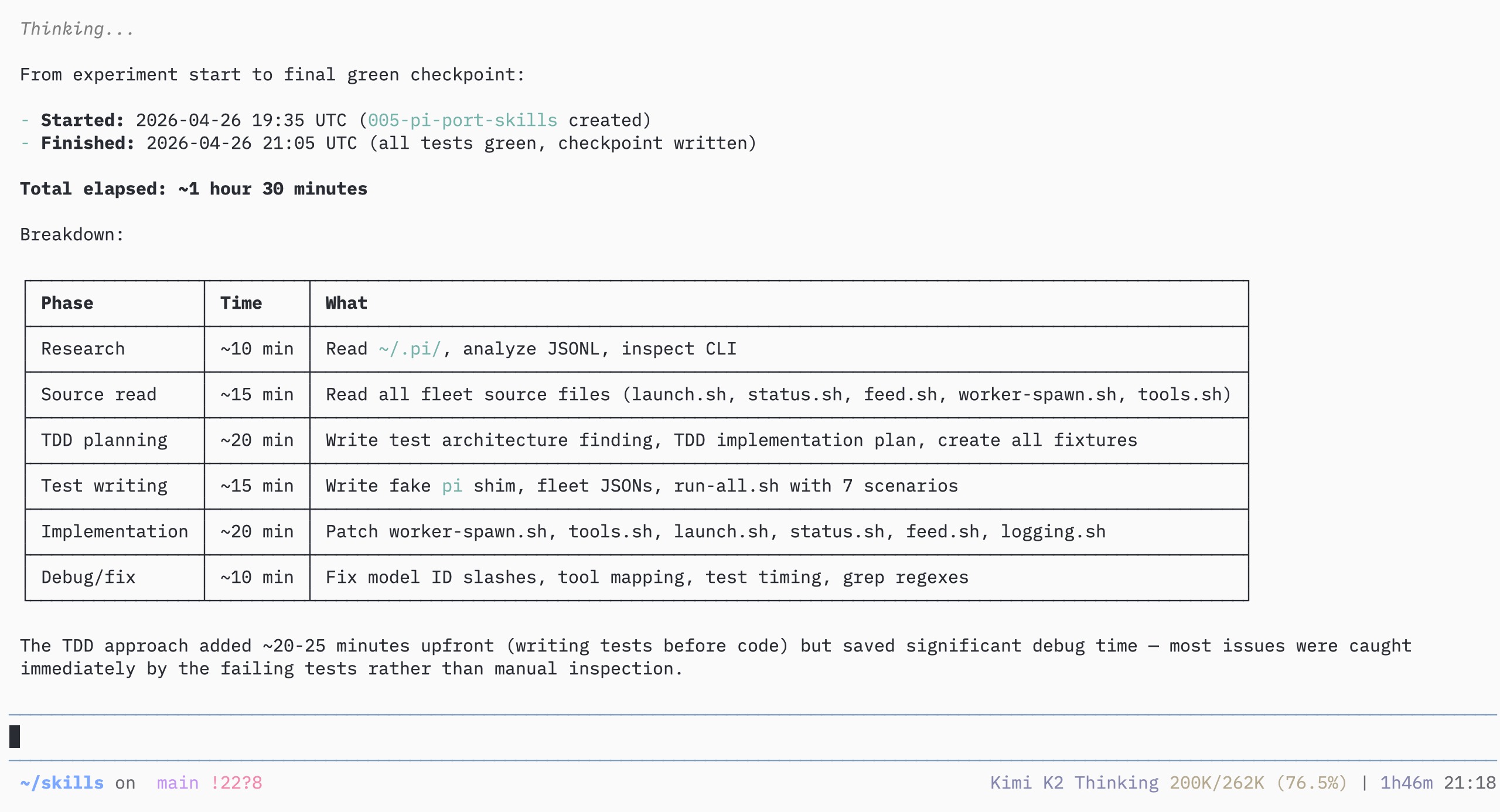
1.5 hour autonomous port of fleet skills to Pi. Tests green, zero hand-holding.
Then I launched my first Pi-native fleet: 18 workers, all running simultaneously, feeding into a shared status monitor.
Headless Mode: Pi as Infrastructure
Claude Code has claude -p. Fire a prompt, get a response, done.
Pi has --mode json and --mode rpc. JSONL event streams. Bi-directional protocol. Typed commands for prompt, steer, model swap, session control. You do not just fire a prompt. You control the session programmatically.
--mode text — human-readable output.
--mode json — JSONL event stream, every token delta as structured data.
--mode rpc — bi-directional protocol, typed commands for prompt, steer, model swap, session control.
This is the difference between a product and infrastructure. You embed Pi. You build on top of it. Eighteen workers, each spawning pi --mode json -p, all feeding into a shared status monitor. The harness was designed for this. Not bolted on later.
RPC commands like {"type": "steer", "message": "..."} mean you control sessions programmatically. Steering works across the entire stack: TUI (Enter while running), extensions (pi.sendMessage), RPC, subagents (steer_subagent). Claude Code has none of this. You wait for a turn to finish, or you kill the session.
| Feature | Claude Code | Pi |
|---|---|---|
| Mid-task redirect | No | Steering queue |
| Follow-up queue | No | Alt+Enter / followUp |
| Extension steer | No | sendMessage API |
| RPC steer | No | JSONL steer cmd |
| Subagent steer | No | steer_subagent tool |
Steering works between tool calls, not mid-generation. If the model is outputting a wall of text, you still wait. But between tool calls, where most agent time is spent, steering is live.
Caveat: pi -p subprocess workers do NOT inherit extensions. My fleet workers are blind to web search because pi-web-access requires TUI context. Workaround: search in the parent session, save to disk, let workers analyze. Single-cwd only. No /add-dir.
The Session Tree: Branching Without Losing Context
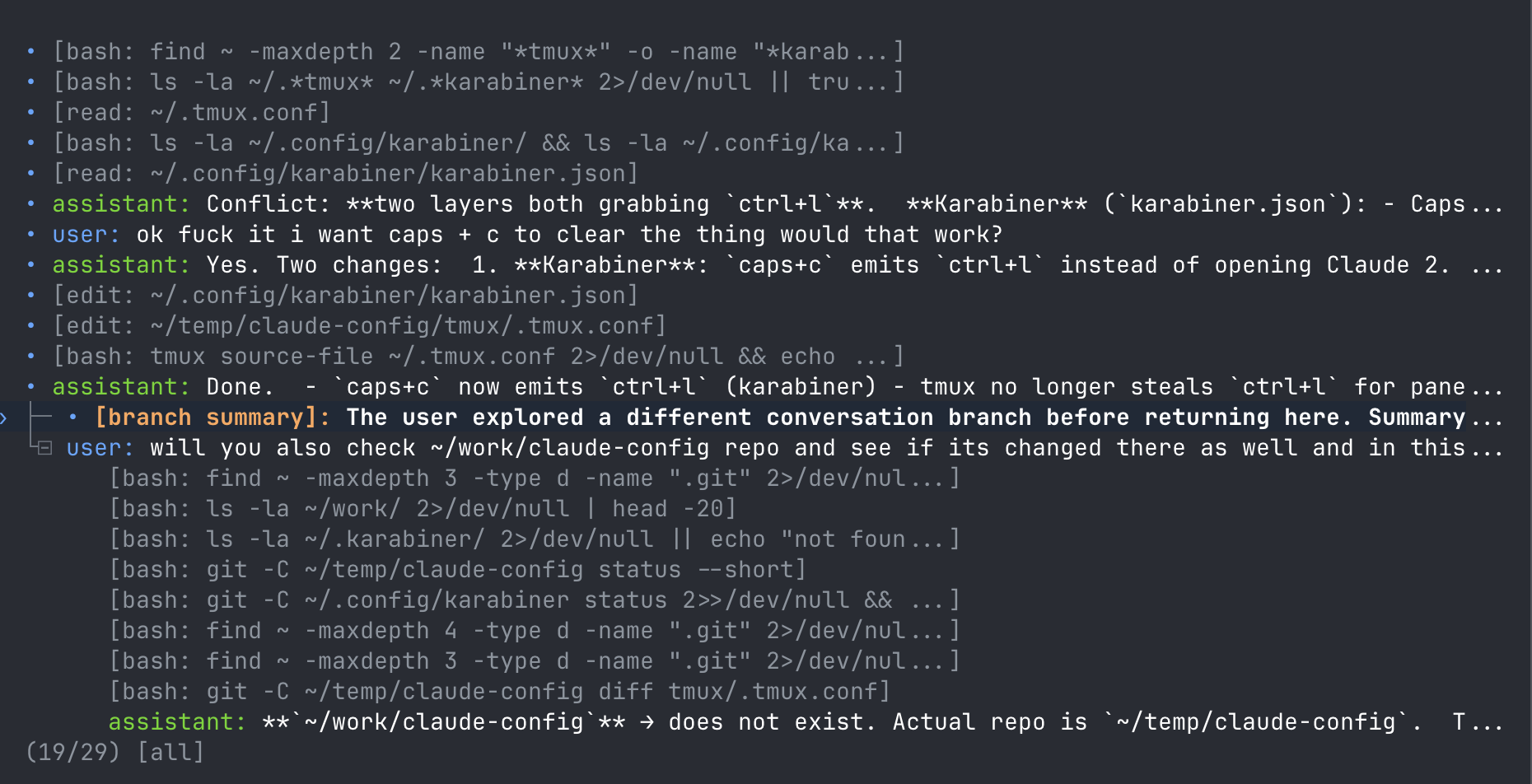
Every message in Pi is a node in an append-only JSONL tree. id + parentId. When you branch with /tree, Pi starts a sibling branch at any prior message. The old branch stays intact. You can navigate with arrow keys, search, fold, and resume any branch.
Here is a real tree from one of my research sessions:
  • user: ok got it right? now i want to expand this list
  • assistant: Here's the bare-minimum brainstorm...
  • user: i am also ok with competitors btw i see myself having 2-3 exit options
  • assistant: Here are 7 additional exit paths...
  ├⊟ • user: ok i see we diverged a bit lets finish the introducer research
  │     • assistant: For each target, here's the bare minimum data...
  │     ├⊟ • user: statyus?
  │     │     • assistant: Fleet Status — All 3 researchers are RUNNING...
  │     └⊟ • user: /doc finding what was wrong with the fleet skill
  │           • [write: ...]
  │           • assistant: Done. Committed and pushed.
  └⊟ • user: can we please document this in finding these exit strategies
        • [write: ...]
        • assistant: Done. Documented everything at: ...
Three parallel threads. Main research. Fleet status check. Bug documentation. All in one session. In Claude Code or Codex, exploring a side idea means losing your main thread. With Pi, side explorations become branches.
| Feature | Claude Code | Codex | Pi |
|---|---|---|---|
| Branching | No | No | Full session tree |
| Session resume | Linear | Linear | Any branch, any time |
| Context preservation | Linear only | Linear only | Tree structure |
| Navigation | None | None | Arrow keys + search |
| Branch summarization | N/A | N/A | Auto-summarizes abandoned paths |
I have used this for side explorations while my fleet runs. When a fleet worker asks a question mid-research, I branch off, answer it, commit the findings, and snap back to the main thread. All context preserved.
Caveat: Cross-project resumes can drift because tools bind to cwd. Symlinked session roots break parent/child linking. These are real bugs (GitHub issues #3249, #3364) that I have hit.
End Note
Four hours straight on my first night. Two subagent extensions. One fleet port. Eighteen workers. I did not ease into Pi. I threw everything at it, broke what did not work, kept what did. Hands dirty, head first. I build things, I break things, and then I build them better. That is the whole point.