Introduction
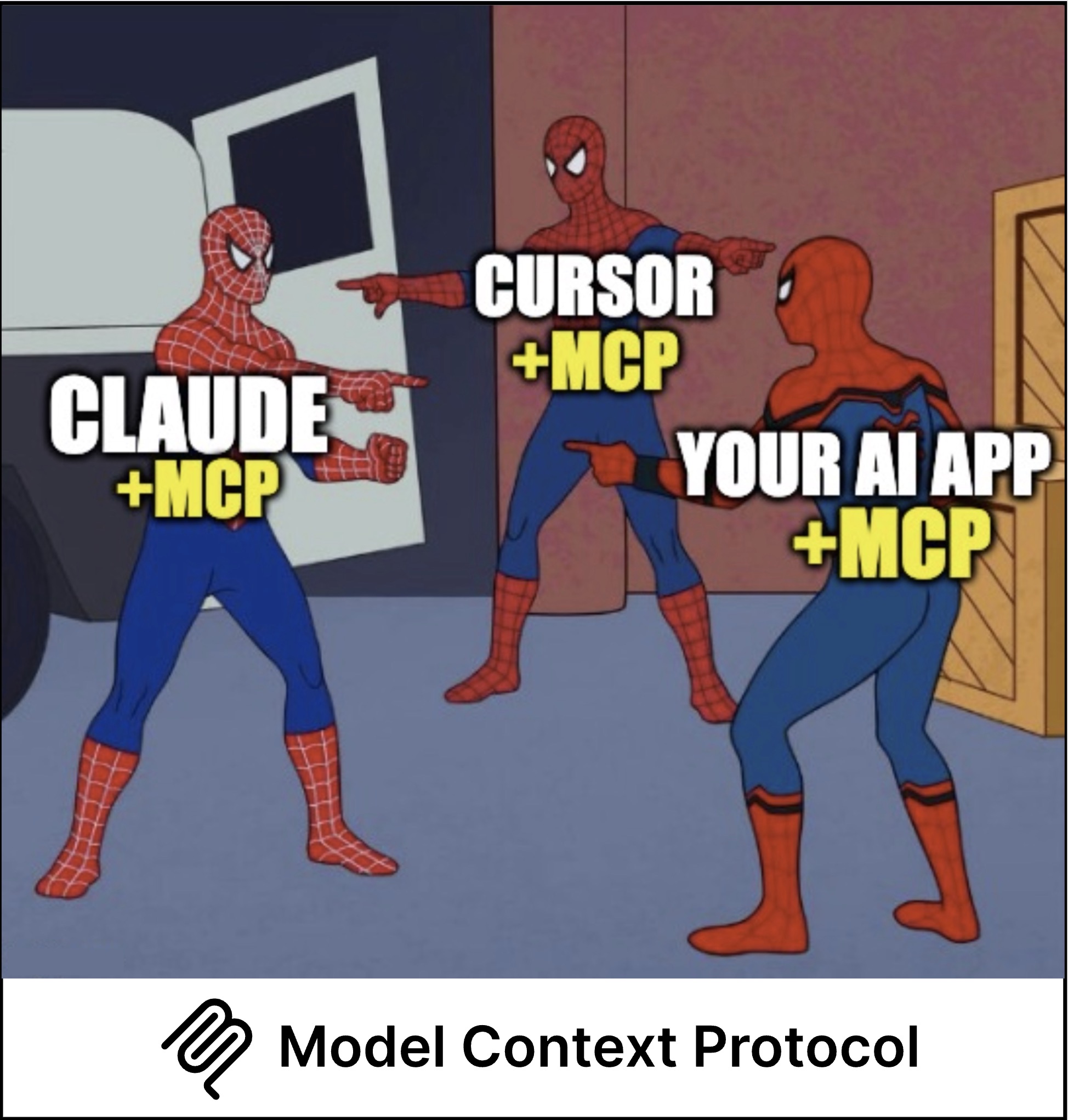
A few months back it was MCP, MCP everywhere, and I was like - what the MCP? Why is it hyped so much?
I mean, we already have function calling in OpenAI, Anthropic, and pretty much every LLM provider. So why do we need another layer? Why should anyone choose MCP over simple function calls?
The more I dug in, the more I realized there’s substance behind the hype. I finally got some time to write about it.
Will be writing about MCP in parts - this part covers fundamentals: what distinguishes MCP from function calling and the basics of architecture associated with it. Let’s dive in!
Let’s start with the problem that MCP actually solves.
The Problem: Integration Hell
Before we talk about MCP, let’s understand what life looks like without it.
Imagine this scenario: You want Claude, ChatGPT, and Cursor to all access GitHub, Notion, and your database. How many custom integrations do you need?
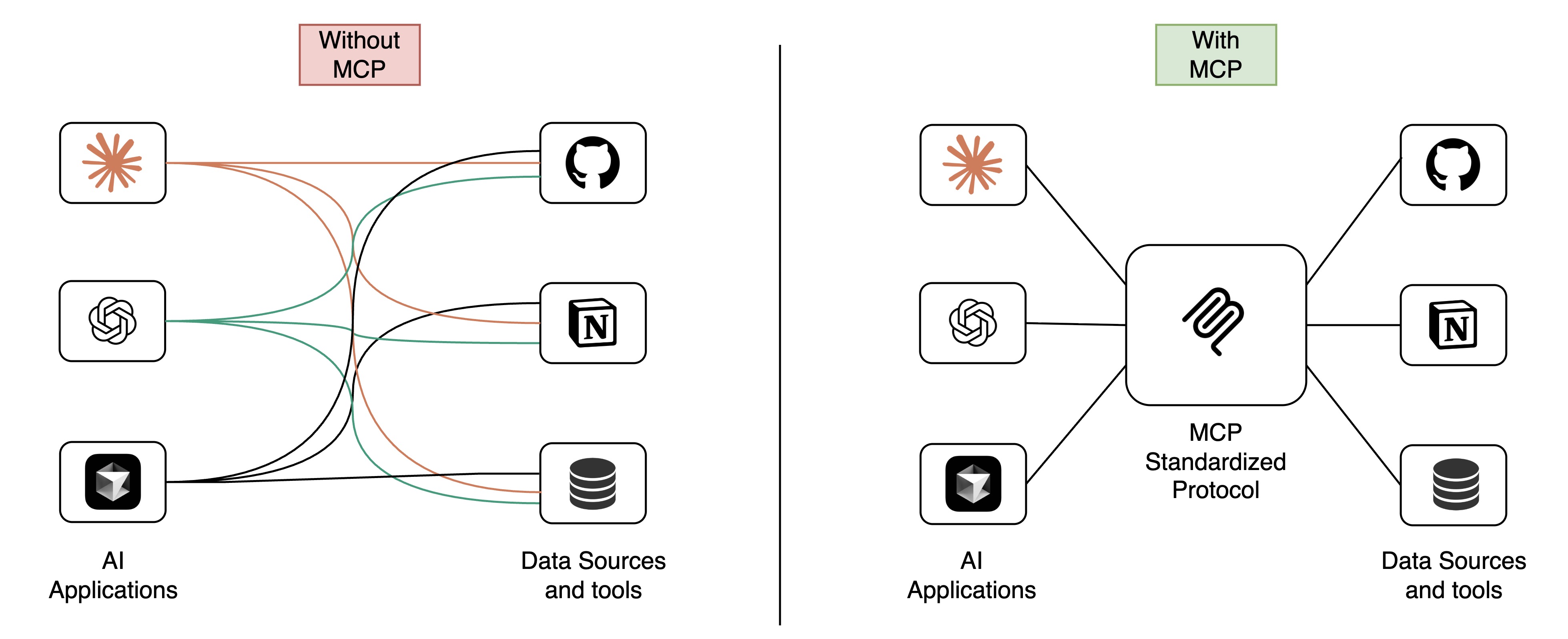
This is the MxN integration problem:
- M (AI applications) × N (data sources) = MxN (custom integrations)
- In this case: 3 AI apps × 3 data sources = 9 separate custom integrations
Here’s where it gets worse: Imagine you want to build an AI agent that monitors GitHub repos, updates Notion project trackers, and logs metrics to your database.
Without a standard protocol, you’d need to:
- Pick ONE AI platform (say, Claude)
- Build custom integrations for GitHub + Notion + Database specifically for Claude
- Write glue code to chain them together
- If you later want to use ChatGPT or Cursor? Start over. Rebuild everything.
Each integration is:
- Fragmented and non-reusable
- Vendor-specific (locked to one AI provider)
- Unable to discover tools dynamically
- Stateless (no persistent context across requests)
- Tightly coupled to your application code
This approach doesn’t scale. Enter MCP.
What is MCP?
Model Context Protocol (MCP) is an open-source standard for connecting AI applications to external systems. Think of it as USB-C for AI - a universal connector that allows any AI model to plug into any data source or tool through a standardized interface.
Announced by Anthropic in November 2024, MCP transforms the MxN problem into an M+N solution:
- Build an MCP server once for your tool
- Any MCP-compatible client can immediately use it
- One GitHub MCP server works with Claude, ChatGPT, Cursor, VS Code, and all future MCP clients
How MCP Solves This
Remember that AI agent that monitors GitHub, updates Notion, and logs to your database? Here’s what changes with MCP:
- Build 3 MCP servers once: GitHub, Notion, Database
- Any MCP-compatible AI (Claude, ChatGPT, Cursor) can now use all three
- The AI can chain operations: Pull from GitHub -> Update Notion -> Log to Database
- Runtime discovery: The AI automatically discovers available tools
- Stateful sessions: Context persists across multiple requests
- Switch AI platforms? Zero code changes needed
You’ve turned 9 custom integrations into 6 reusable components (3 AI clients + 3 servers), and they work together seamlessly.
For details on MCP’s architecture (Host/Client/Server components), see Appendix: MCP architecture.
MCP vs Function Calling: The Honest Comparison
Here’s the question that got me started: If OpenAI, Anthropic, and other LLM providers already support function calling natively, why add another layer with MCP servers?
What Function Calling Does Well
Function calling is simpler for many use cases:
- Direct integration: Define functions inline with your application code
- No extra processes: No need to run separate server processes
- Model-native: Built directly into OpenAI, Anthropic, and other APIs
- Stateless & simple: Pass function definitions with each API call
Example (OpenAI function calling):
1response = openai.ChatCompletion.create(
2    model="gpt-4",
3    messages=[{"role": "user", "content": "What's the weather?"}],
4    functions=[{
5        "name": "get_weather",
6        "description": "Get weather for a city",
7        "parameters": {...}
8    }]
9)
Where Function Calling Falls Short
| Limitation | The Problem | How MCP Solves It |
|---|---|---|
| Vendor Lock-in | Your function definitions only work with one LLM provider | MCP servers work with any MCP-compatible client (Claude, ChatGPT, Cursor, VS Code) |
| No Stateful Sessions | Each API call is isolated - no persistent context or connections | MCP maintains long-lived connections with session state |
| No Bidirectional Communication | Functions can’t request LLM completions (no sampling) | MCP servers can ask the client for AI completions (agentic workflows) |
| No Runtime Discovery | Functions must be hardcoded in your application | MCP clients dynamically discover available tools via tools/list |
| Tight Coupling | Function implementations are embedded in your app code | MCP servers are independent processes - update without redeploying your app |
| No Standardized Resources | No protocol for exposing read-only data sources | MCP has first-class support for resources (files, DB records, API responses) |
Bottom Line: If you’re building a quick prototype or single-purpose app, function calling is often enough. If you’re building infrastructure, tools for teams, or want to leverage the MCP ecosystem, the extra complexity pays off.
So far, we’ve covered the what and why of MCP. But here’s where it gets interesting: MCP isn’t just a theoretical standard - it’s rapidly becoming the de facto way AI applications connect to the world.
Let’s look at how fast this ecosystem has grown.
The MCP Ecosystem: From Lukewarm Launch to Industry Standard
The adoption story is remarkable given how recent this is. MCP launched in November 2024 - just one year ago. The initial reception was muted, but by early 2025, it exploded, with over 1,000 community-built servers by February.
Why It Went Viral
AI-Native Design
Unlike generic standards adapted for AI use, MCP was specifically architected for LLM workflows from the ground up. The protocol distinguishes between:
- Model-controlled tools (actions AI decides to take)
- Application-controlled resources (data the app provides)
- User-controlled prompts (templates users invoke)
Complete Ecosystem Launch
MCP didn’t launch as just a specification. Anthropic shipped:
- Official clients: Claude Desktop, Claude Code
- 19 reference servers: Filesystem, Git, Memory, PostgreSQL, Slack, etc.
- SDKs: Python and TypeScript with full documentation
- Developer tools: MCP Inspector for debugging
OpenAI’s Endorsement
The tipping point came in March 2025 when OpenAI CEO Sam Altman announced that OpenAI would adopt MCP rather than build a competing protocol. This was huge - getting both rivals to align on a single standard is rare in tech. It created immediate industry consensus.
Market Impact (2025 Data)
- 90% of organizations believe MCP is essential for AI applications
- 90-95% plan to increase MCP investment in the next two years
- 2,000+ MCP capabilities in the official registry (Smithery.ai)
- 20,000+ GitHub stars for FastMCP framework alone
Viral Moment: Blender MCP
One of the most compelling demonstrations of MCP’s potential came from Siddharth Ahuja, who built an MCP server that lets Claude control Blender directly. With just a few text prompts, you could create complete 3D scenes:
This demo received 1.6M views and showed the world what’s possible when AI can actually do things beyond just generating text.
Building Your First MCP Server
We’ve covered enough theory. Now let’s get our hands dirty with some code.
I’ll walk you through building a simple weather MCP server - a minimal but functional example that demonstrates the core concepts. You’ll see:
- How to define tools that the AI can call
- How MCP handles the protocol layer (so you don’t have to)
- How to connect your server to Claude Desktop in under 5 minutes
Here’s what you’ll build:
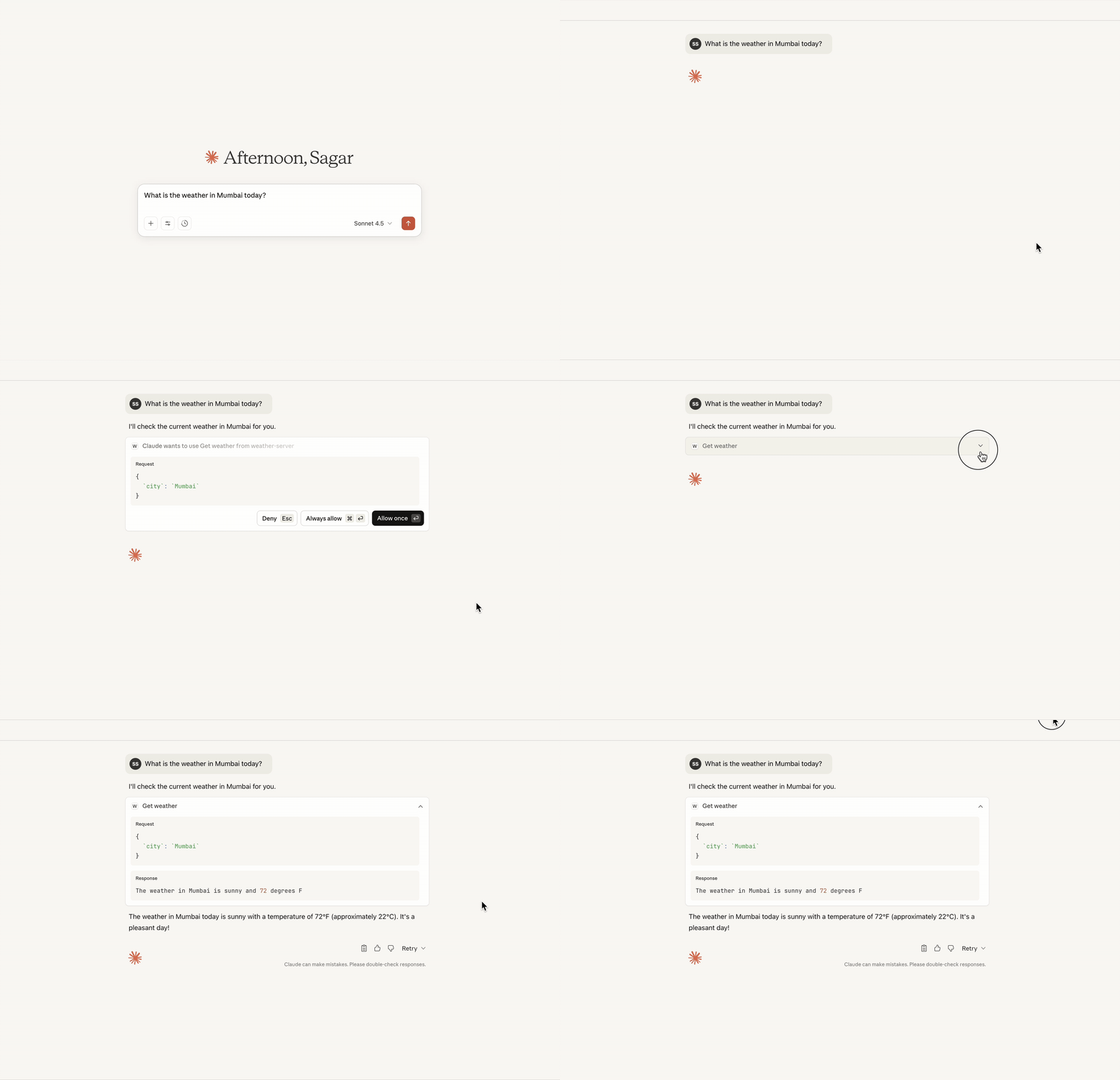
Weather MCP server in action with Claude Desktop
This takes just 5 minutes to build. Here’s the complete code:
Connecting to Claude Desktop
Locate your Claude config file:
- macOS:
~/Library/Application Support/Claude/claude_desktop_config.json - Windows:
%APPDATA%/Claude/claude_desktop_config.json
- macOS:
Add your server configuration:
 1{
 2  "globalShortcut": "",
 3  "mcpServers": {
 4    "weather-server": {
 5      "command": "uv",
 6      "args": [
 7        "run",
 8        "--with",
 9        "fastmcp",
10        "python",
11        "/absolute/path/to/your/server.py"
12      ]
13    }
14  }
15}
Note: Replace /absolute/path/to/your/server.py with the actual path to your server file. If uv is not in your PATH, use the full path (e.g., /Users/yourname/.local/bin/uv on macOS or C:\Users\yourname\.local\bin\uv.exe on Windows).
- Restart Claude Desktop - your server is now accessible!
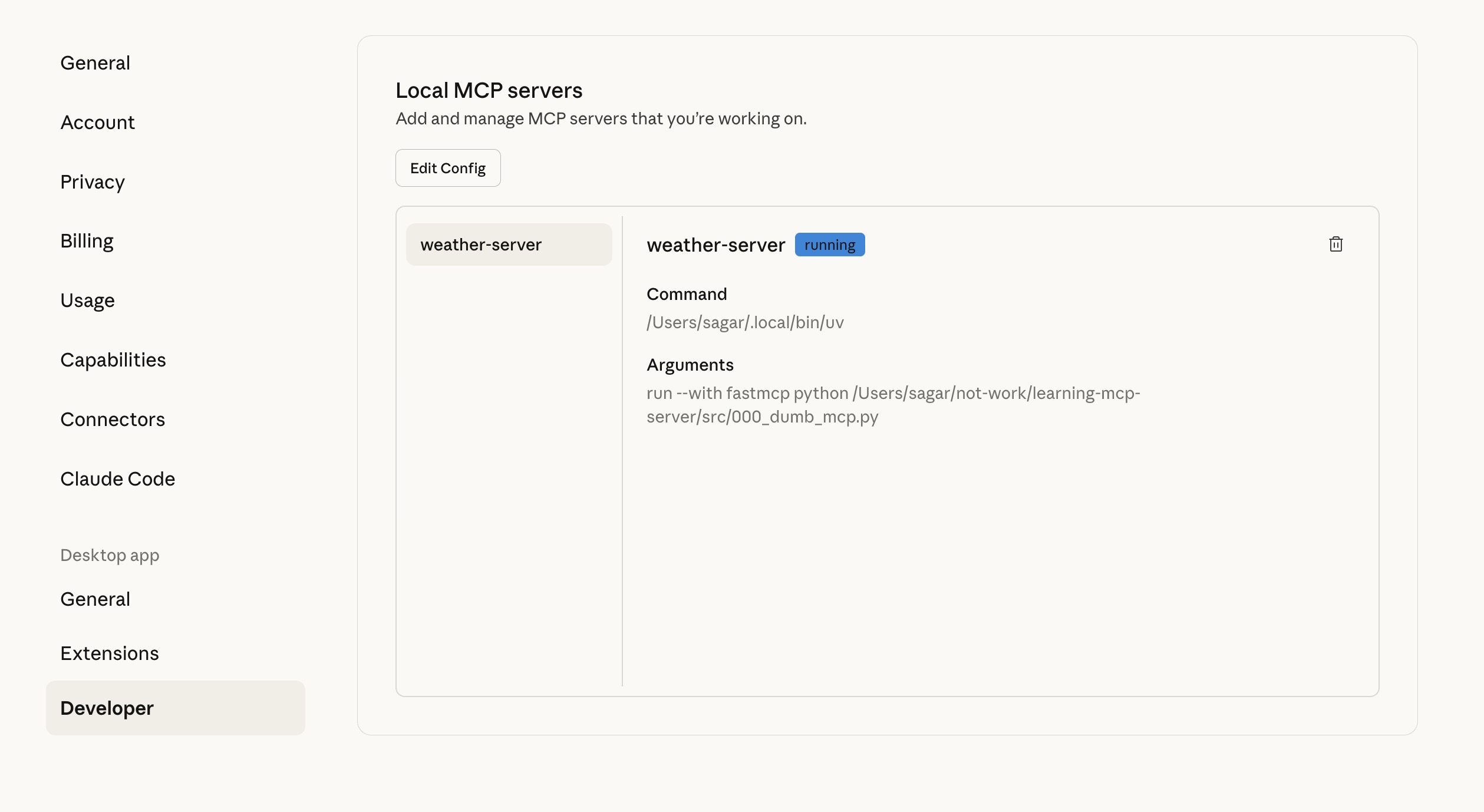
Claude Desktop developer settings showing configured MCP server
Once configured, you’ll see your MCP server’s logs in Claude Desktop log files:
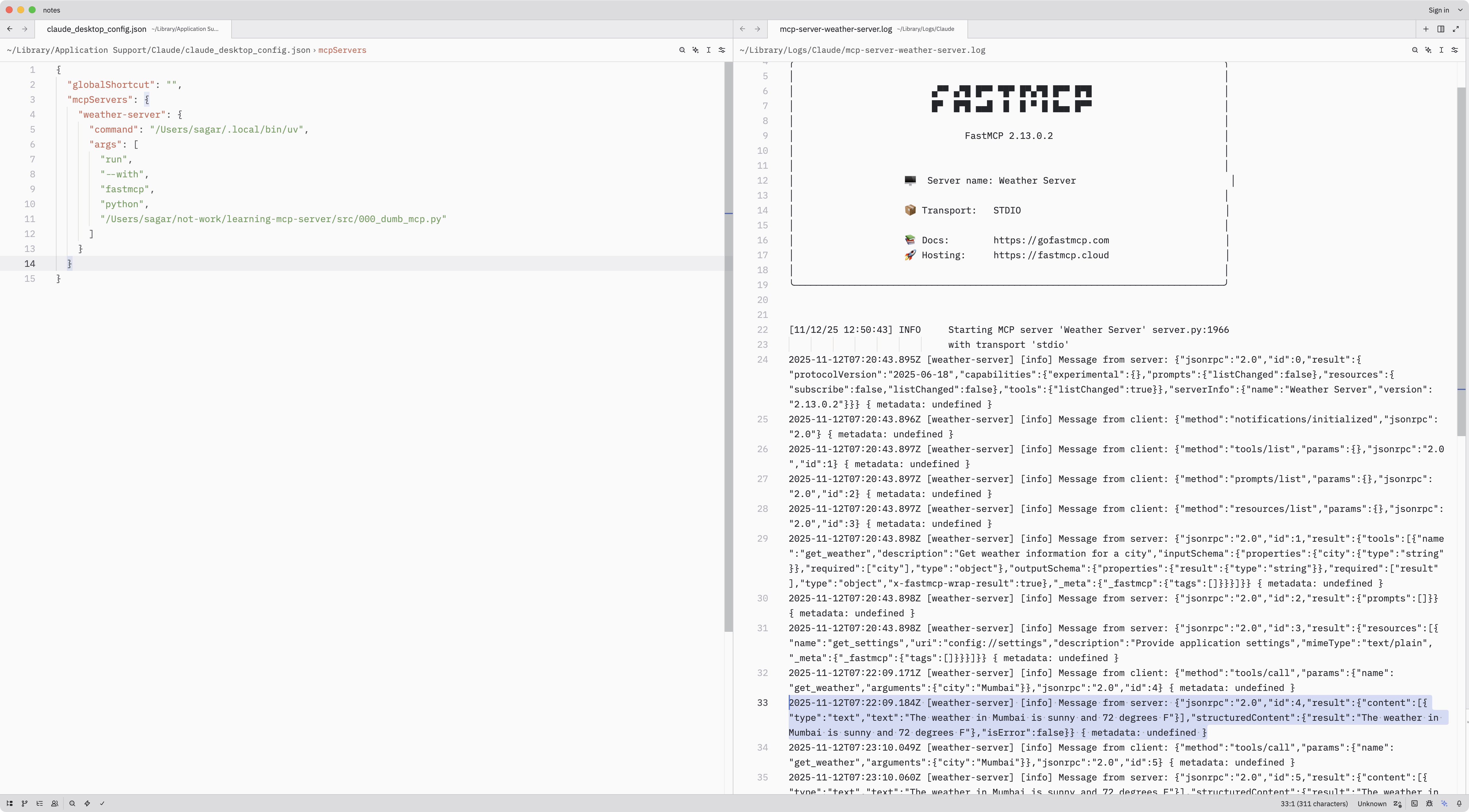
MCP server successfully connected in Claude Desktop
Final Thoughts
When I started researching MCP, I was skeptical. “Just another protocol,” I thought. But the more I dug in, the more I realized this is different.
MCP isn’t just another protocol - it’s a standardization moment for AI integration. Just as USB-C unified hardware connections and HTTP standardized web communication, MCP is unifying how AI applications connect to the world.
What makes it different?
- It solves the MxN integration problem -> M+N solution
- It’s not about replacing function calling - it’s about standardizing the ecosystem layer
- Industry consensus: OpenAI, Anthropic, Microsoft are all aligning
- Grassroots momentum: 2,000+ community-built servers in one year
What’s next? I’m currently building a production-grade MCP server for real-world use cases, and I’ll be sharing my learnings in the upcoming parts. We’ll dive into:
- Database integrations with proper connection pooling
- API aggregators with rate limiting and caching
- Authentication and authorization patterns
- Error handling and retry strategies
- Deployment and monitoring
Until then, try building your first MCP server. Start with the weather example above, then think about what data sources or tools you want AI to access. That’s where it gets fun.
Stay tuned for Part 2!
Appendix
MCP architecture
MCP follows a distributed client-server architecture. The architecture consists of three core participants:
e.g., Claude Desktop] Client1[MCP Client 1] Client2[MCP Client 2] Client3[MCP Client 3] end subgraph "MCP Servers" Server1[MCP Server 1
GitHub] Server2[MCP Server 2
Database] Server3[MCP Server 3
File System] end subgraph "Server Components" Tools[Tools
Executable Functions] Resources[Resources
Data Sources] Prompts[Prompts
Templates] end Host -->|manages| Client1 Host -->|manages| Client2 Host -->|manages| Client3 Client1 <-->|JSON-RPC 2.0
stdio/SSE| Server1 Client2 <-->|JSON-RPC 2.0
stdio/SSE| Server2 Client3 <-->|JSON-RPC 2.0
stdio/SSE| Server3 Server1 -.->|exposes| Tools Server2 -.->|exposes| Resources Server3 -.->|exposes| Prompts style Host fill:#e1f5ff style Client1 fill:#fff4e1 style Client2 fill:#fff4e1 style Client3 fill:#fff4e1 style Server1 fill:#e8f5e9 style Server2 fill:#e8f5e9 style Server3 fill:#e8f5e9 style Tools fill:#fff3e0 style Resources fill:#fff3e0 style Prompts fill:#fff3e0
MCP Host
The orchestrator (like Claude Desktop) that manages multiple client instances and coordinates context from various sources simultaneously.
Example: When you open Claude Desktop and configure 3 MCP servers (GitHub, Postgres, Filesystem), Claude Desktop is the Host.
MCP Client
Maintains individual one-to-one connections with servers. Each client instance is dedicated to a single server connection.
What “client instance” means: The Host creates a separate client object/process for each server. If you have 3 servers configured, the Host spawns 3 client instances:
- Client Instance 1 ↔ GitHub Server (handles only GitHub communication)
- Client Instance 2 ↔ Postgres Server (handles only Postgres communication)
- Client Instance 3 ↔ Filesystem Server (handles only Filesystem communication)
Think of it like having 3 phone calls happening simultaneously - each client instance is one dedicated phone line to one specific server. The Host coordinates all these conversations.
MCP Server
Lightweight programs that provide contextual data and functionality through a standardized protocol. Servers expose:
- Tools: Executable functions (database queries, API calls, computations)
- Resources: Static or dynamic data sources (files, records, API responses)
- Prompts: Reusable interaction templates (workflows, commands)
Example: A GitHub MCP server exposes tools like search_code, create_issue, resources like repo://user/project/README.md, and prompts like “Review this PR”.
When to Use Function Calling vs MCP
This diagram briefly captures the decision tree when deciding between Function Calling and MCP.
support?} Q1 -->|YES| MCP[MCP] Q1 -->|NO| Q2{Tool reusability
across apps?} Q2 -->|YES| MCP Q2 -->|NO| Q3{Stateful
sessions?} Q3 -->|YES| MCP Q3 -->|NO| Q4{Bidirectional
communication?} Q4 -->|YES| MCP Q4 -->|NO| Q5{Runtime tool
discovery?} Q5 -->|YES| MCP Q5 -->|NO| FC[Function Calling] FC --> Note[Simpler, tightly coupled,
vendor lock-in OK] MCP --> Note2[Infrastructure overhead,
standardization benefits] style Start fill:#e1f5ff,stroke:#01579b,stroke-width:3px style MCP fill:#e8f5e9,stroke:#2e7d32,stroke-width:4px style FC fill:#fff3e0,stroke:#e65100,stroke-width:4px style Note fill:#fff9c4,stroke:#f57f17,stroke-width:2px style Note2 fill:#fff9c4,stroke:#f57f17,stroke-width:2px
References
- Building Agents with MCP - Anthropic Official Workshop
- Model Context Protocol Official Docs
- FastMCP Framework
- Awesome MCP Servers Collection
- What is MCP and why you should pay attention?